24 Hours of Harvester
TL;DR: Harvester is kind of a swing and a miss, and also I don’t know of anything doing it better.
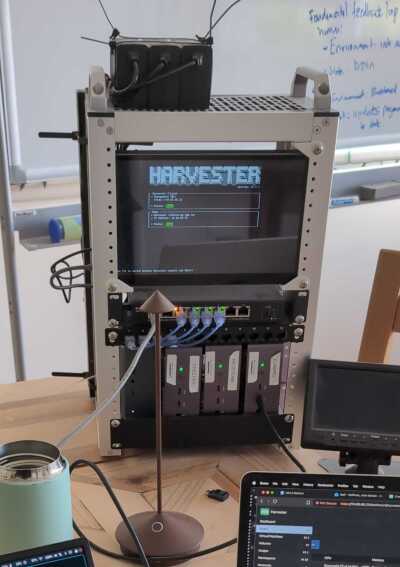
I built this small cluster a few years ago and have been playing around with various ways to deploy systems into it. The full learning for that lesson should be reserved for a different post, but one thing I have learned: deploying anything in a meaningful way onto multiple physical systems like this is a real challenge. Even “trivial” load balancing (e.g., round-robin HTTP requests to cloned systems) itself is fairly non-trivial.
That’s why I’m on this neverending hunt to find something that really makes it more pleasant or interesting to operate in this kind of physical hardware architecture. At present, it all just feels like a slog.
Industry has landed on Kubernetes (shortened to “k8s”) as their savior. I’ve worked with k8s enough to understand why it’s so appealing. K8s was also the first time I realized some software can be too complex to be “worth it.” But it also bends development and deployment to its will, and carries a tremendous amount of required complexity for proper use. For all of the “simple UIs” I’ve used, it never seems to actually simplify the behemoth that is the helmsman (Kubernetes). Harvester is bigger than just k8s, enabling legit virtualization and also including a very polished, simple web UI, and all of that part is nice.
That’s kind of the best hook I have for Harvester: simplifies the hardware part, but doesn’t really solve the complexity part. Of course, they’re also not targeting my cute little home cluster, but rather some real big-iron Gibsons in the datacenter, so let’s give them some slack there too.
A word of warning: for a lot of settings, Harvester installs immutably, meaning if you goof something up during setup (e.g., Hostname, IPs), you have to go through the full installation process to change it. This gets a little old by the third mistake. Also don’t forget in your BIOS to disable secure boot and enable hardware virtualization.
My only actual complaint about Harvester is that, because they install immutably, Harvester doesn’t give enough up-front guidance on how to configure your network, specifically DHCP vs Static IPs. I wish I had known in advance to just stick with my static IPs, because I goofed up the first two install attempts just by letting DHCP pick IPs without any static mappings. I did this because DHCP is the default and nowhere do they give you guidance or recommendations that I found in my day of experimenting. Better network guidance alone could have saved me about half of the trouble that I ran into. My management IP ended up at 10.66.66.21 and my nodes ended up as 10.66.66.11-13 in the final, mostly-correct seeming setup.
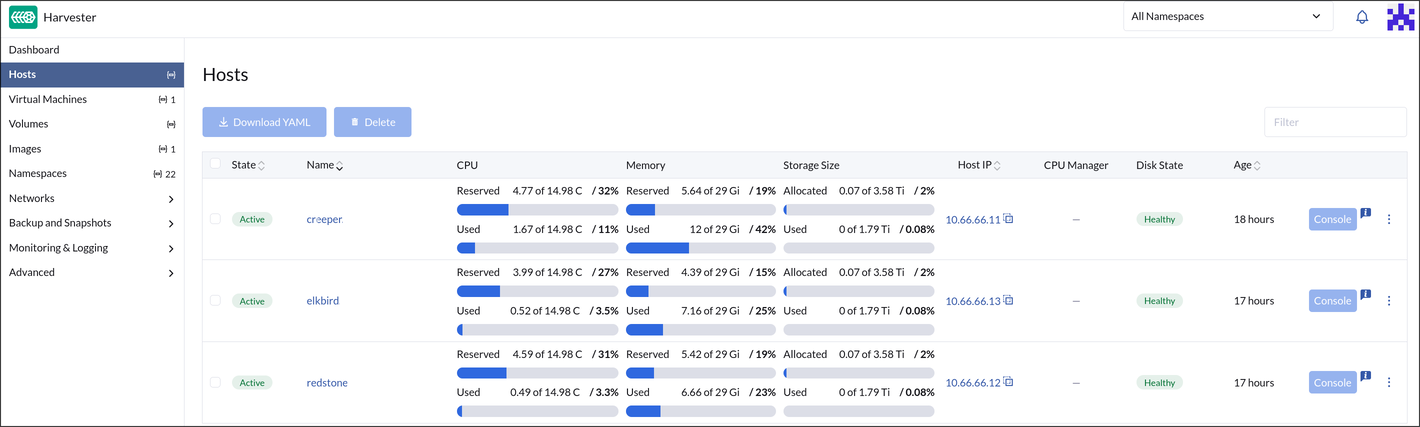
I don’t really know what I was expecting, but what I’m left with is clearly a cluster. All my nodes show up in the UI, sporting 3-10% idle CPU utilization now and 8-16 GiB of RAM usage (I guess the management node uses 8 GiB of its own?). I knew k8s was fairly “overhead” hungry; this is worse than I anticipated. Mind you, this is all with no VMs or containers running at all.
The Web UI is slick. I appreciate the utilitarian design and speed with which it works. It does little to paper over the inherent complexity of trying to deploy bare metal k8s anywhere. That’s what’s interesting to me about Harvester: they have managed to paper over a lot of the worse parts of the setup, however they left the worst parts of using systems like this in place. Not only do you need to really understand the fundamentals of all parts of a deep networking stack (including DNS, DHCP, IP allocations), you also have to understand the idiosyncracies of how Harvester wants them configured. And you always have to configure them to get anything running.
I guess that’s great for the folks the eat, sleep, breath k8s or are spinning up a 256 node datacenter somewhere (the actual target market for Harvester), but there has to be a better UI model for the rest of us.
I love the concept of Harvester, now that I’m kind of at the end of this little 24 hour experiment, I’m left with a CPU hungry layer living on top of my 3 node cluster using 32-40 GiB of ram to blink the indicator lights on the network switch, with exactly the same (undesirable) idiosyncracies of the other tools I’ve used before.
2026-04-13 86:75:30.9